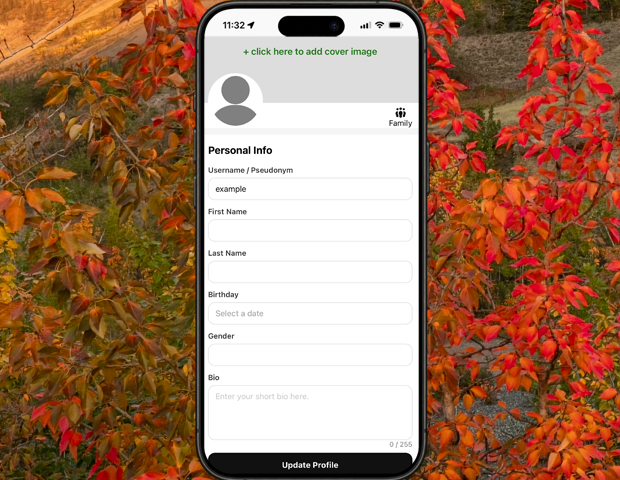
Getting started
Here’s how.
Getting There
From the root menu > tap the user button (it the main circle in the center bottom of the app) > tap Settings in the top right of the user menu.Cover Image
When first setting up you profile you'll see an empty rectangle at the top of the screen. Tap that and choose the image you would like to upload for your cover image.Avatar
By tapping the circle on the top left of the settings page you can choose what image you would like to upload for your user avatar.Username / Pseudonym
When you created an account, the app chose a random string to you as a username. You may change your username here. Currently usernames must be a minimum of 5 alphanumeric characters.
Once the box around the input turns green you have found a username that is available.First & Last Name
These are optional. If you choose to be known by your username you may leave them empty.Birthday
Birthdays are used to tell minor accounts from adult accounts. If birthdays are left empty, they will be treated as minor accounts.Gender
Optional. In fact, we might have left that out from being useful in the app at all. But if it comes back.Bio
Give a little introduction about yourself. This will display on your main profile page under your cover image and avatar.Social Profiles
Link to your other social media accounts on different platforms. 02GO isn't a one size fits all social media platform so if you want people to see your meme's, AI generated content, rants or philosophies, or clickbait by all means share them with your friends and followers. Just not here.Residences
Residences are primarily used to populate your user map. They are completely optional. If you don't want people knowing where you do or have lived, do not add it. It's just an entertaining feature if you want to use it.Public Profile
If this is toggle on. The public can see your profile with anything you've set as public (as long as you're not a minor).
If it's toggled off people will only see your name, username, and avatar in order to be able to send you friend requests.
Always Load My Location
My default the map will center on your location when you open it.Logout
Click it to log out.Delete Account
Click this if you want to burn it to the ground. We'll delete your account and remove your content.
Need a hand? Ask us about this feature →